AI Object Remover

Remove unwanted people, objects, text or wires from a photo by describing them. The rest of the image stays untouched.

Photo
Prompt sent to the model

Remove from the photo and fill the area naturally so it matches the surroundings. Change nothing else.

Your results appear here

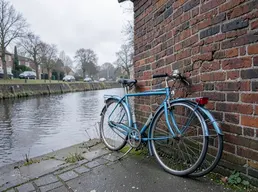
Until you press Generate, this is a sample the tool made.

Object Remover sample made with FLUX.1 Kontext [pro]Generated sample photo the tool started fromSample start photo
Sample made with FLUX.1 Kontext [pro], 60 credits

No brushing or masking: say what to remove and FLUX Kontext erases it, filling the gap to match the scene. Everything else in the photo stays as it was.

How it works

  1. Upload the photo
  2. Describe what to remove
  3. Generate and compare with the original

Tips for better results

  • Be specific about position: 'the red car on the right', not 'the car'.
  • Remove one thing at a time for the cleanest result.
  • If Kontext leaves traces, try Nano Banana Pro.

What people make with it

  • Travel photos without tourists
  • Real estate photos without clutter
  • Product shots without props

Questions

How much does it cost?

Each generation uses credits from your plan. The exact number shows on the Generate button before you spend anything, and failed generations are refunded automatically. New accounts get free credits to try it.